Bringing AI-assisted creation into Kokai

Contextual targeting at TTD relies on custom categories
Advertisers use custom categories - collections of chosen keywords - to target ad placements against specific content. Today, custom categories are built through exact or token matching, which means an advertiser typing "apple" gets results for both Apple the fruit and Apple the technology company, with no way for the system to disambiguate. Advertisers with specific contextual needs end up either over-broadening their targeting or building exhaustive keyword lists manually.
This matters more now than it used to. Contextual targeting was historically a blocking tool - more often than not, applied retroactively to keep ads away from unsafe content. As the industry shifts away from third-party identifiers, contextual is becoming a preemptive targeting strategy in its own right. Custom categories that can't disambiguate intent are a real ceiling on that growth.
The first AI-powered workflow in Kokai
Since this is the first AI-powered workflow in Kokai, a lot more is at stake than the feature itself. We're setting precedent for how AI shows up across the platform visually, in iconography, and in language. Decisions made here will be inherited by every AI workflow that follows.
The first version
The data team came in with a working prototype of the flow they envisioned: (1) users enter keywords, (2) the LLM returns categorized results that users can recategorize and relabel, (3) the system shows a preview of the content their ads will appear alongside. To help me understand the requirements from their end, I quickly mocked up how the flow would appear in the Kokai UI (Step 2 shown to the right), but as I studied it more closely, I realized that the recategorization step served to better train our model rather than to provide any direct user benefit.
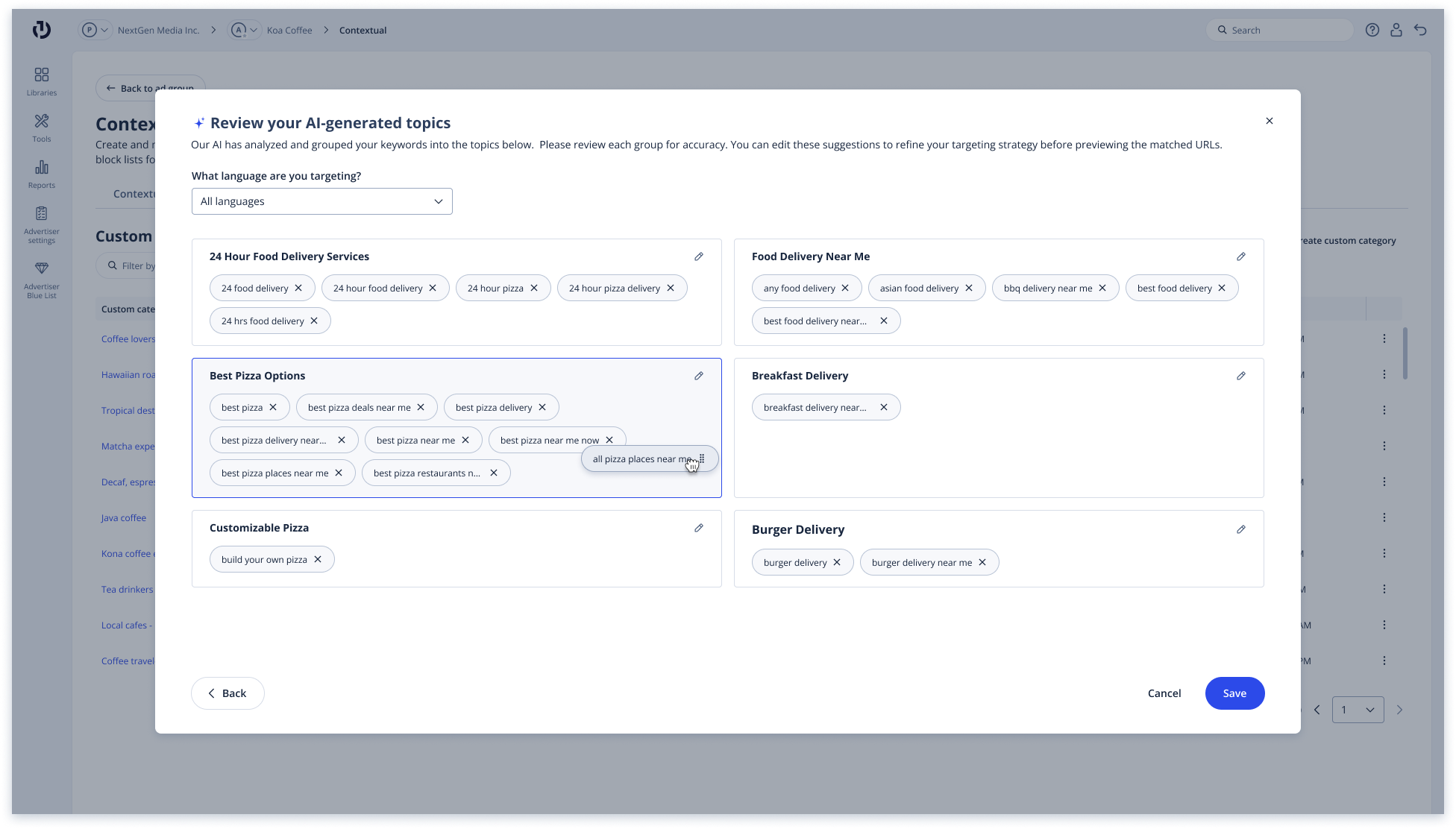 V1 - The data team's proposal executed in design: users are asked to recategorize the LLM's outputs
The alternative
I brought this back to the team and proposed an alternative: rather than asking users to clean up the model's outputs after the fact, give the model better inputs upfront. Specifically, ask users to provide a short business statement alongside their keywords, so the LLM can infer intent (i.e.: Apple the company vs. Apple the fruit) before generating results. This shortened the user flow significantly and presented users with more accurate results right away.
AI workflows present a risk of designing user steps around model needs (more training data, fewer hallucinations, easier validation) rather than user needs. Identifying these journeys and reframing the flow to prioritize user needs feels like a core competency for designing AI products.
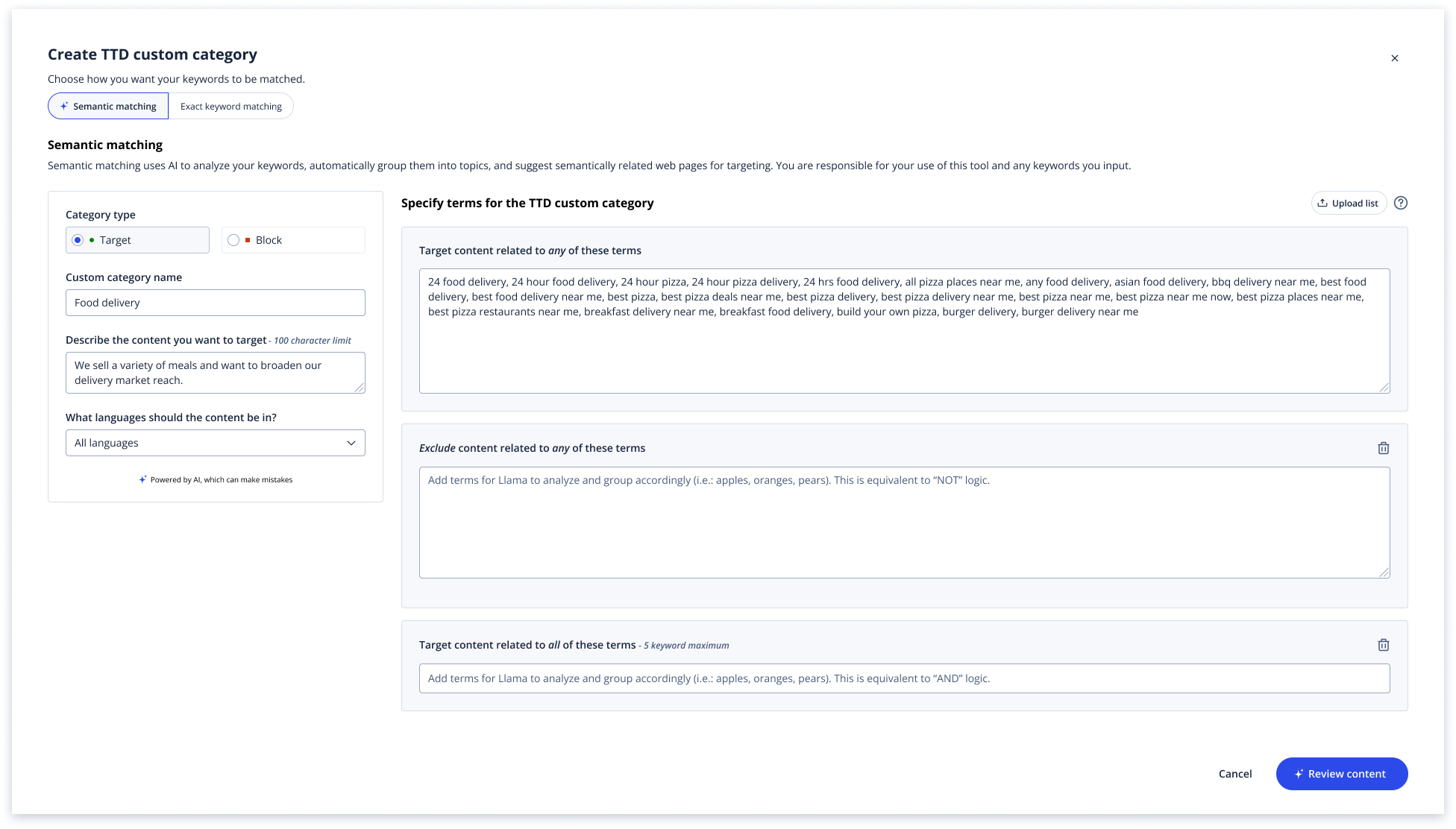 V2 - My reframed design: requiring a business goal upfront to help the LLM infer intent before generating results
A parallel exploration
In parallel to these efforts, I also proposed a chat-based experience that lets advertisers describe their intent conversationally, following a more universally accepted AI pattern.
A parallel design problem: boolean logic framing
V2's structured flow presents a usability issue I flagged to the team. Custom categories allow advertisers to combine targeting rules using boolean logic (targeting content matching all keywords vs. any keyword and/or blocking all keywords presented vs. targeting keywords with some exclusions). Users may end up misreading "all" as "any," conflate "block" with "exclude," or skip the choice entirely and ship campaigns with unintended targeting.
V3's chat-based experience minimizes this risk by letting users describe intent in their own words, with the LLM inferring the logic or asking clarifying questions when needed.
I'm working alongside my content writer to present clearer copy, with plain-language defaults, and inline examples to improve user comprehension of these rules, since both versions will need to communicate these concepts clearly, even if the chat-based version handles them implicitly.
The team's response
The data team and our PM advocated for the structured V2 approach with fewer degrees of freedom, more predictable outputs, and an easier validation model. Both have real merit, and the tradeoff between expressive flexibility and predictable accuracy is going to keep surfacing as AI features expand across the platform. To move this forward, I'm planning usability testing to determine whether advertisers can articulate their intent clearly enough in the business goal for the LLM to disambiguate accurately, as well as correctly infer the language we use in the boolean logic offerings.
Workflow-oriented tasks may benefit from more structured AI tooling than chat-based experiences.
Chat-based AI experiences have become the default, but for specific, workflow-oriented tasks, they may not be the most efficient pattern. Open-ended natural language inputs introduce too many degrees of freedom and can distract from the task at hand. Structured AI tooling often serves users better with its constrained inputs, clear paths, and predictable outputs. The input panel approach in this workflow was a small version of that bet.
Building things out in design fidelity can surface problems overlooked in technical specs.
The data team came in with a working prototype that made sense in spec form: collect keywords, return categorized results, let users refine them. It was only when I mocked it up in the Kokai UI that the recategorization step revealed itself as model-serving busywork - useful for training the model, not really for the user. In hindsight, it seems obvious, but it wasn't visible until the flow existed as actual screens. The design pass isn't just execution; it's where you find out whether the workflow holds up.
Designing for model confidence without showing the score.
Most AI recommendations are presented with uniform certainty, regardless of how confident the underlying model actually is. The design question shouldn't be about whether to show uncertainty, it should be about how to match user trust to what the model is actually doing, without undermining the recommendation itself. Confidence scores are useful, but they place cognitive load onto the user. In this workflow, we used the model's confidence to sort recommendations, surfacing the highest-confidence outputs first, without exposing the underlying scores. The model's confidence shaped the experience without becoming a cognitive burden.